In this blog we are going to look at the importance of Mastercam Lathe Stock Flip and the benefits. We will also share a Stock Flip guideline to help you master the Stock Flip operation.
What is Stock Flip?
Use the Lathe Stock Flip dialog box to create a stock flip operation. This lets you program operations on the opposite side or back of a lathe part in the same Mastercam file. Stock flip operations output a comment and program stop in the NC code, which lets the operator manually remove the stock and reposition it in the chuck.
NOTE
Before programming a stock flip operation, you need to have defined the stock and chuck boundaries in the Stock Setup tab.
Stock Flip in action
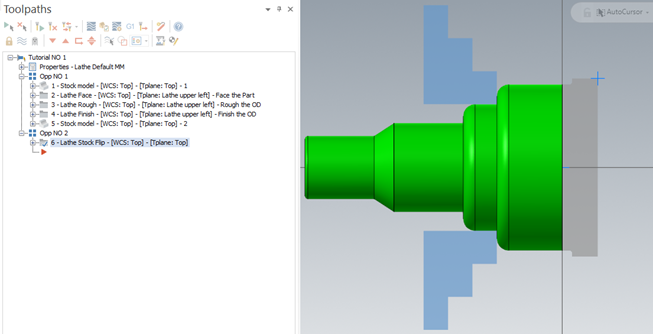
As seen on the picture below, on the one side of this part the machining is complete. But what approach can be taken for the other side of the part as this still needs to be machined? And how can this be done in the same Mastercam file?

Well, Mastercam Turning has a whole section of options called Part Handling as seen on the picture below. From here we will use the Stock Flip option program the operation on the opposite side of the lathe part in the same Mastercam file

Stock Flip Guideline
When using the Stock Flip please follow the guideline below:
- Transfer geometry needs to be on.
- Then use the select button to select the Geometry/Part which needs to be Flipped.
- Leave Blank original geometry off.
- Offset by 10 in order for the Geometry/Part to be copied to a clean Level.
- Stock Original Position should not change.
- Transferred Position value needs to be changed to minus the full length of the part.
- Original Chuck position of D & Z should not change.
- Final Position of D needs to be changed to the new clamping position on which you chuck will be clamping on.
- Final position of Z needs to be changed to value of which the chuck Z- will be clamping on.

Using the above guidelines, the part has now been flipped and the remaining Stock is presented in the correct orientation to be machined. The Chuck is also presented at the correct section of the Part to be safely and realistically machined.
Benefits of using Stock Flip
- Use the Same Part file and Machine parameters.
- Reposition stock on the same spindle.
- Safe time by using Mastercam Part Handling instead of rotating and transforming a part that is already in position.
We trust that using Flip Stock and the guidelines above will increase your productivity. Watch our webinar with a live demonstration on Flip Stock here.
If you require Mastercam assistance, please feel free to contact our team: Contact Us – MECAD Manufacturing (mecadmfg.co.za)