In modern CNC manufacturing, success comes down to a fine balance: pushing cycle times to the absolute limit while maintaining total confidence that your program won’t crash a high-value spindle. Mastercam 2027 delivers on this balance with a laser focus on production efficiency, modernised user interfaces, and refined motion control.
From everyday organisation in the Levels Manager to complex 5-axis multiaxis strategies and Mill-Turn environments, this release is built to keep your spindles turning.
Here is a deep dive into what is new in Mastercam 2027 and how these updates will elevate your shop floor.
1. Streamlined File Organization: Levels Manager Enhancements
Keeping complex CAD models organised – especially when dealing with multiple setups, fixtures, and stock models – can involve dozens of mouse clicks. Mastercam 2027 streamlines file organisation right inside the Levels Manager.
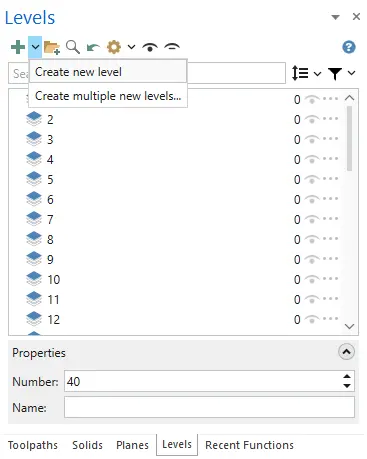
Batch Level Creation: Rather than adding levels one by one, a new dropdown menu next to the Add Level button lets you create a specific range of levels (e.g., Levels 10 through 20) in a single click.
Dynamic Navigation & Live Renaming: You can now cycle through levels directly from the bottom Properties panel using simple arrow buttons. Type a new level number or name into the Properties panel, and Mastercam will dynamically rename it or instantly create the new level if it doesn’t already exist.
2. A Clean, Modernised Approach to Machine Definitions
Managing machine kinematics, control files, and component libraries historically relied on legacy dialog windows. Mastercam 2027 transitions these critical workflows into a modern, panel-based interface that improves visibility and prevents accidental shop-wide parameter changes.
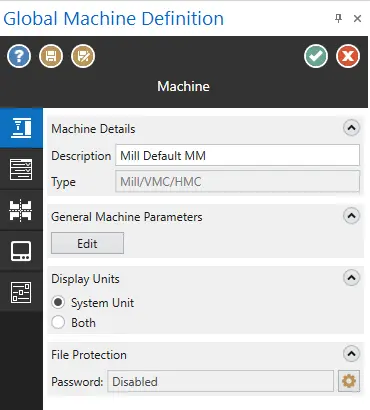
Ribbon & Panel Layout: Machine Definitions and Control Definitions now share a clean, dockable panel layout integrated into the main ribbon interface.
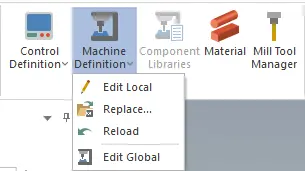
Local vs. Global Definitions: Mastercam 2027 introduces a clear separation between global machine definition templates and local file definitions. Making an edit to a machine setup inside a specific part file no longer risks overwriting the master global machine definition used across the rest of your shop.
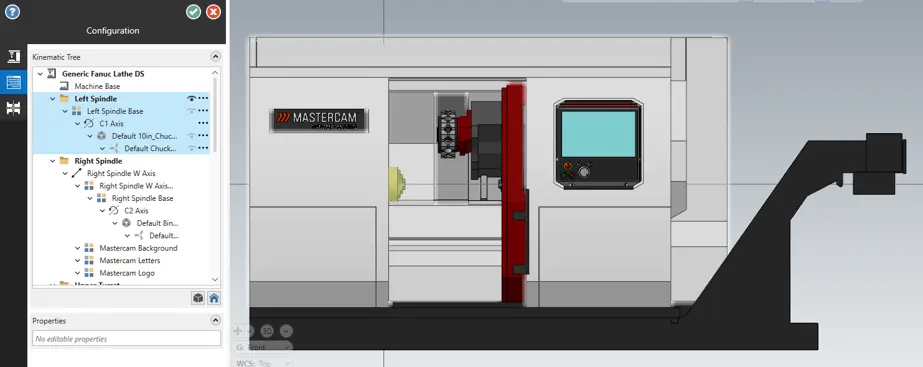
Kinematic Tree & Graphics Sync (Mill-Turn): Selecting a physical component (like a rotary platter or spindle head) in the Kinematic Tree instantly highlights the geometry in the 3D graphics display, complete with built-in configuration error validation indicators.
3. Standardised Mill-Turn Setup Experience
Mill-Turn setups demand high precision, complex synchronisation, and dynamic tool tracking. Mastercam 2027 brings the Mill-Turn setup workflow in line with standard Milling setup groups, offering a more intuitive visual experience.
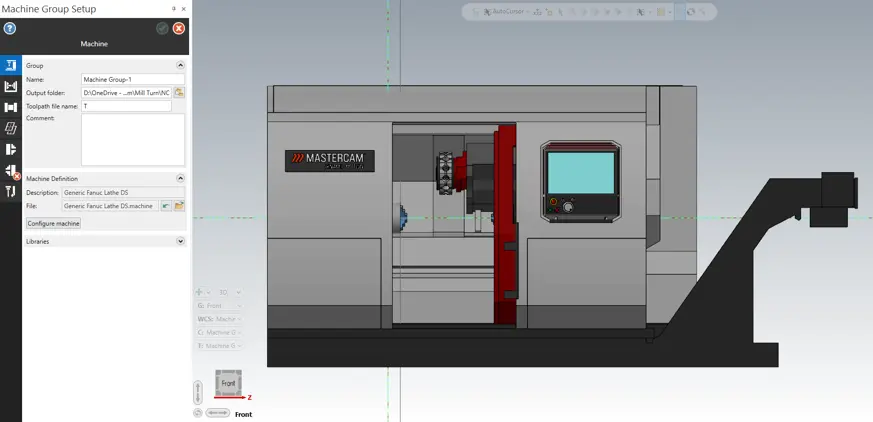
Tab-Based Machine Group Setup: Mill-Turn users will immediately feel at home with a tab-based setup structure that mimics standard Milling workflows.
Real-Time Machine Visualisation: View your stock, workholding, and spindle configurations directly inside the 3D viewport during setup – allowing you to spot mounting errors or clearance issues before generating your first toolpath.
Enhanced 3D Tool & Holder Models: Expanded support for complex 3D tool models and accurate holder geometries ensures that your offline simulation matches real-world clearance tolerances precisely.
4. Smarter Automated Deburring
Manual bench deburring remains one of the most labor-intensive bottlenecks on the shop floor. The Deburr toolpath enhancements in Mastercam 2027 give you precise control over edge selection and tool motion to finish parts right on the CNC machine.
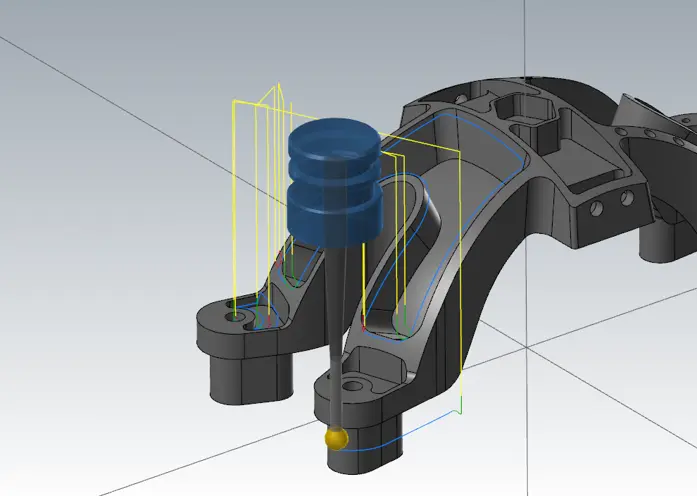
Spiralise Closed Contours: When applying multi-pass deburring to closed boundaries, Mastercam 2027 can spiral the motion into a continuous pass, completely eliminating retracts and lead-in marks.
User-Selected Edge Ordering: You retain full manual control when you need it. Chain your edges in the exact sequence you want them machined, and Mastercam will strictly follow your chosen order.
Backside Chamfer & Slot Mill Support: The Deburr toolpath now natively supports backside chamfer tooling and slot mills, allowing you to use both top and bottom cutting edges to debur top faces, undercut regions, and bottom hole edges in a single setup.
Intelligent Edge Filtering: Auto-detection algorithms now automatically filter out non-critical edges – such as small fillets or sharp internal intersection lines – reducing the time spent cleaning up automatically selected geometry.
5. Multiaxis Innovations: Smarter Paths, Smoother Motion
Mastercam 2027 continues to set the benchmark for 5-axis machining. Whether you are roughing complex aerospace pockets or putting a mirror finish on impellers, these multiaxis enhancements deliver smoother vector control and greater safety.
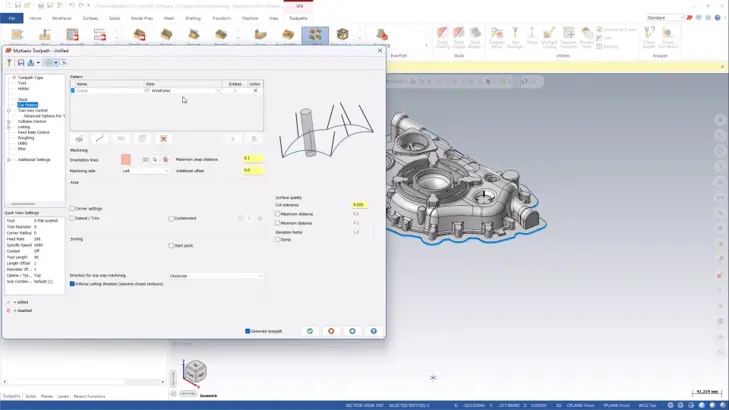
Fixture-Aware Multiaxis Pocketing: Multiaxis Pocketing toolpaths now incorporate real-time dynamic collision checking against fixtures, clamps, and raw stock, allowing tools to tilt cleanly away from obstacles automatically.
Smoother Vector Transitions: Refined tool axis control options prevent abrupt rotary axis acceleration, resulting in smoother machine motion, reduced machine wear, and superior surface finishes.
Automated Rest Finishing: Mastercam 2027 detects leftover material from larger preceding tools in tight 5-axis corner regions, applying targeted rest-milling toolpaths to eliminate un-machined material safely.