SigmaNEST allows operators to program 5 times faster on average, all you need are the tools to optimize your process. One such tool is AUTOTASK…
AutoTask allows the operator to take the laborious task of manually entering the nesting parameters for every Material Grade and Thickness, and simplifies it. This process allows the user to process jobs far quicker and get more orders out the door than previously. The AutoTask function splits all the different grades with the different thicknesses into separate Nesting tasks all at one time saving the operator time.
The first step is to set up the defaults for the AutoTask function.
This is done by selecting AutoTask under the nesting tab and clicking on Defaults, as shown below:


A window called “Auot Task Setup” will appear, this is where all the defaults for the different materials and thicknesses for said material are set up. You select the arrow next to the corresponding material and a list of the thicknesses that accompany the material will appear. To setup the function select a thickness and fill in the relevant fields with the parameters you require. It is Important to note, if you want to use Stock sheets and remnants you must select it in the check box. Once all the parameters are setup click ADD. If you have already setup default task parameters, you can use those in AutoTask by selecting “Parameters Auto Lookup”.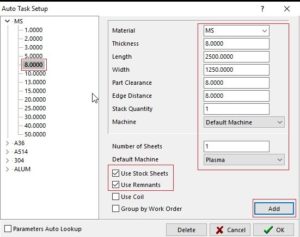
The “Auto Lookup” parameters can be found in “Technology Setup” within the “Tools Help” tab. Once in Technology setup, move to machine parameters tab and select the drop-down arrow next to the machine and select Task Parameters. This will then show you a list of all the default task parameters created by the user on the system. Users can add default parameters or edit them here. Default parameters can also be set up when creating a new task. Once all new task parameters are created for said material and thickness, just click the “set as default”. All these default settings will be remembered by SigmaNEST the next time you perform a nesting.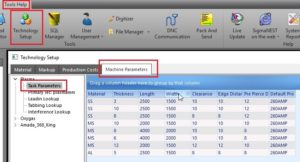
Once all the default settings have been setup for the different materials and the corresponding thicknesses, the operator can begin with the AutoTask function. The only laborious task a operator has to perform is to setup all the default parameters, this is however a once-off procedure and the operator never has to setup defaults again. That being said, if a new material or thicknesses is added to the database the operator will have to setup a default for the new material and thickness.
The second step is to AutoTask the parts in the operator’s workspace. All the parts required for the Work Order or Job will be listed in the Auto Task window, the operator can import extra parts by means of the “Parts List” or “Import BOM” by clicking the import tab. If the workspace is cleared and one clicks on Auto Task, one can also import parts from “Work Orders”.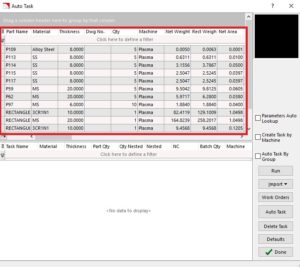
The final step in the Autotask procedure is to click the Auto Task tab and generate all the required nesting tasks to be completed on the workspace. The tasks will generate automatically, and because all the default parameters were setup before hand no added setup or programming is required before you Nest and NC the programs. The operator can then go and NEST and NC the programs as per usual and Post the NC code to the machines and begin cutting.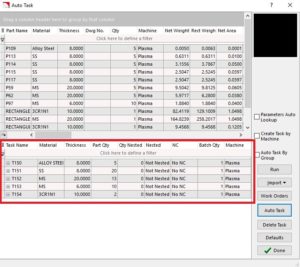
Nesting does not have to be as time consuming and as laborious as one generally thinks, there are many tools at your disposal in order to optimize your productivity and to speed up processes. With SigmaNEST AutoTask only being one small function that can make your life as the operator easier you can minimize your programming time and process far more jobs than you previously would with manual tasking. Should you require any more help regarding more functionality and extra help on SigmaNEST functions, click the “?” icon on all dialogue boxes, else do not hesitate to contact SigmaNEST Support team.