Saving, sending & opening PDF files on virtually any device, anytime, anywhere has become our new normal.
But what if you could save a dynamic PDF file which displays an interactable embedded 3D model?
Amongst Mastercam 2021’s many new and improved features we will explore an option for you to save all the currently visible entities and toolpaths in your part as a dynamic 3D PDF as shown in Figure 1.
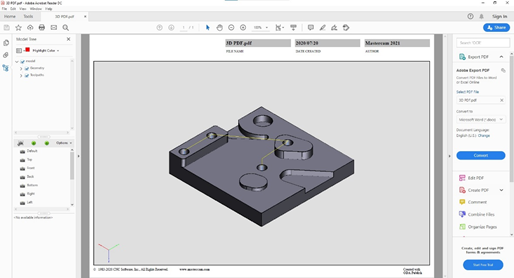
Once saved, anyone can view and interact with that 3D PDF file with any 3D PDF enabled viewer, like Adobe Acrobat Reader.
It is important to note that the 3D PDF preserves important part data such as Planes, Entities, Levels, Dimensions & Toolpath Operations and you can control the view of this data by selecting & de-selecting the item boxes in the PDF reader’s Model Tree as in Figure 2.
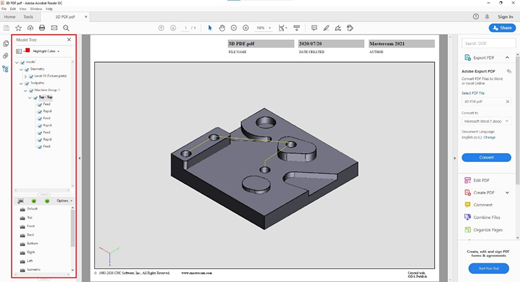
When interacting with the embedded part you can click on faces and Toolpath moves you want to identify, zoom in or out, change display views and live rotate the part to get the perfect view of each angle.

Saving this 3D PDF file type is also very simple to do, just click on “File” – “Save As” – select your save destination & select “.pdf – 3D PDF File” from the “Save As Type” drop-down menu as in Figure 4.
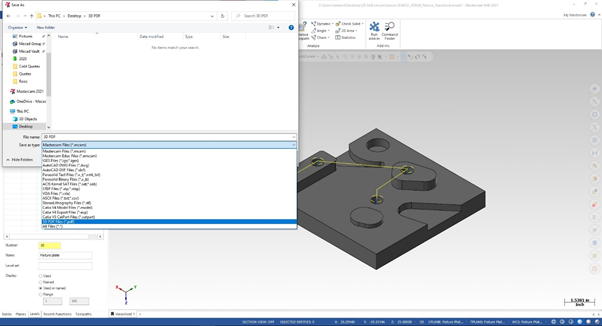
When selecting the 3D PDF File type you will see an “Options” button next to the “Save” button, when selecting “Options” you can enable the “Open PDF file after saving” selection.

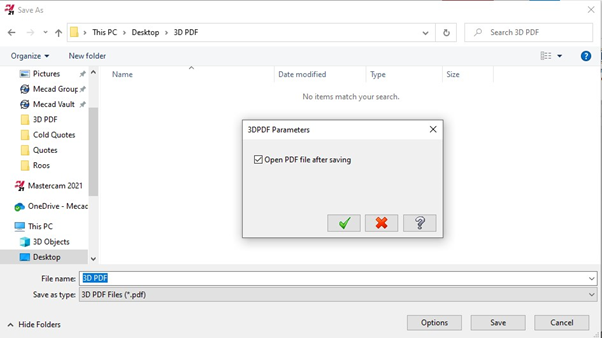
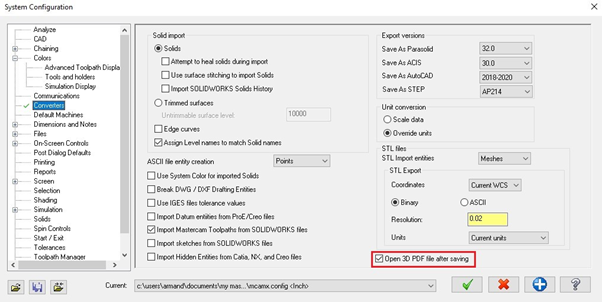
This setting can be enabled as a default when following “File” – “Configuration” – “Converters” and enabling the “Open PDF file saving” tick box.
This is just one of the Many new features available in Mastercam 2021. Please visit whatsnew.mastercam.com for all the new features and improvements.
Author: Armand Pieterse Business Development Executive